Getting started
Connect your app
Client-specific setup with steps and commands.
Client setup
Choose your app and follow its setup steps. The guide explains the available sign-in options and any limitations.
OAuth: choose your account or an agent profile with selected access during authorization. Profile selection and setup.
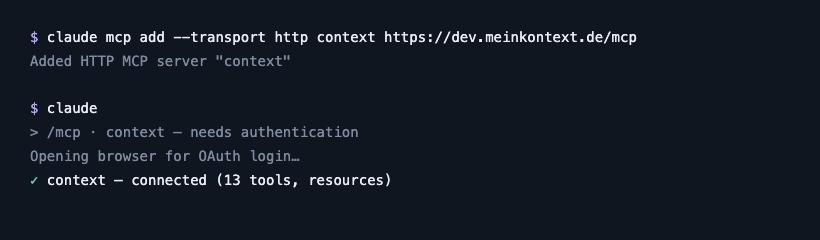
- Run the command below in your terminal, then authenticate inside a session: run
/mcpand pick this server — a browser login opens, that's it (no token needed).
claude mcp add --transport http context https://meinkontext.de/mcp- Current setup and environment expansion: Claude Code MCP documentation.
- With a personal OAuth connection, ask: “Set up meinKontext for this project using
setup_client. Prefer relevant skills, memory and knowledge without repeated reminders.” Name the connection as configured in your client. Agent profiles and org API keys cannot run personal setup. - The tool returns a recipe; your agent checks the effective instruction file and adds only its marked routing block. Existing rules remain. It does not copy your context or switch off native memory, but it tells your agent to save lasting facts only in meinKontext. On request it can supply a local hook and rollback recipe; your client must install and trust it. Supported local versions get a project or user recipe; unknown versions and browser/cloud clients get session instructions. Start a new session afterwards.
- Ask the agent to check with
action: "check"or remove withaction: "remove". A matching block hash confirms only the client-reported structure. Test a relevant task in a fresh session to see whether it actually reads the skill or memory. Keep the local installation receipt: it lets the agent remove its unchanged block even when the server is offline. Modified or duplicate blocks require reconciliation.
Variants: project config & org API key (headless) — not needed for the normal browser login
- Project-scoped alternative: commit a
.mcp.jsonwith{"mcpServers":{"context":{"type":"http","url":"https://meinkontext.de/mcp"}}}.
# headless / read-mostly (org API key instead of OAuth) — SINGLE quotes:
# they keep the literal ${VAR} in the stored config, expanded from the
# environment at runtime, so the token itself never lands in the file.
claude mcp add --transport http context https://meinkontext.de/mcp \
--header 'Authorization: Bearer ${MEINKONTEXT_TOKEN}'- Use SINGLE quotes around
${MEINKONTEXT_TOKEN}— double quotes make your shell expand the token into the stored config before the CLI sees it. With single quotes the literal${VAR}is stored and resolved from the environment at load time, so the stored configuration contains the placeholder. Protect the environment or secret store that supplies the actual key separately.